Devices that participated in the beta program typically get the stable update within a few weeks.
For other users, it's best to regularly check for updates via Settings or stay tuned to Motorola's official channels.
Key Features and Changes in Android 17
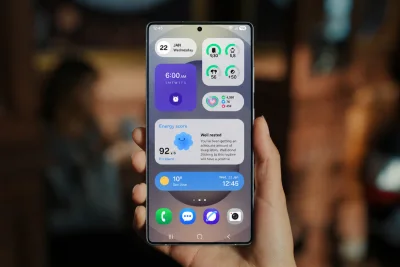
Android 17 brings visual and functional upgrades to Live Updates, now integrated into the camera cutout in the middle, similar to Apple's Dynamic Island.
>>> REDMI K100 Pro series first-week sales: Pro Max shines at 135%
It also expands compatibility with more apps.
The Settings page UI has been revamped to look more like Pixel UI, with new status bar icons, a new volume interface, and updated Wi-Fi, cell tower, and battery icons.
There's also a new Classic Control Center.
The HelloUI app drawer now features improved background blur, a create folder button, and removed app titles.
Apps appear in a 3×3 grid instead of 2×2, and they appear tinted.
Android 17 also introduces new clock faces, typography, and style options for a more personalized lock screen. However, there's still no depth effect feature.
Motorola has made it easier to take screenshots with a three-finger swipe-down gesture and enable split-screen with a three-finger swipe-up gesture.
>>> Beats 360 leak reveals 1.75x stronger ANC and IPX4 rating
New features include Landscape Stereo, Qira AI assistant, Enhanced HDR Brightness, and Battery health.